
Discover how a smart home hub explained can simplify your life in Singapore. Unify devices, enhance automation, and boost reliability today!


Most tech-savvy homeowners in Singapore assume that a voice assistant and a handful of apps are all they need to run a smart home. Then the frustration sets in. Different apps for the aircon, lights, and security camera. Automations that fail when the internet drops. Devices from separate brands that simply refuse to talk to each other. A smart home hub explained properly changes the entire picture. It is the central nervous system that connects every device, translates between protocols, and runs your automations locally, without depending on a cloud server halfway across the world.
Table of Contents
- Key takeaways
- What is a smart home hub and how does it work
- Smart home hub features and Singapore-specific needs
- Benefits of smart home hubs for energy efficiency
- When you need a dedicated hub versus a voice assistant
- Choosing and setting up your smart home hub
- My honest take on smart home hubs in Singapore
- Transform your home with T-Space Mall’s experts
- FAQ
Key takeaways
| Point | Details |
|---|---|
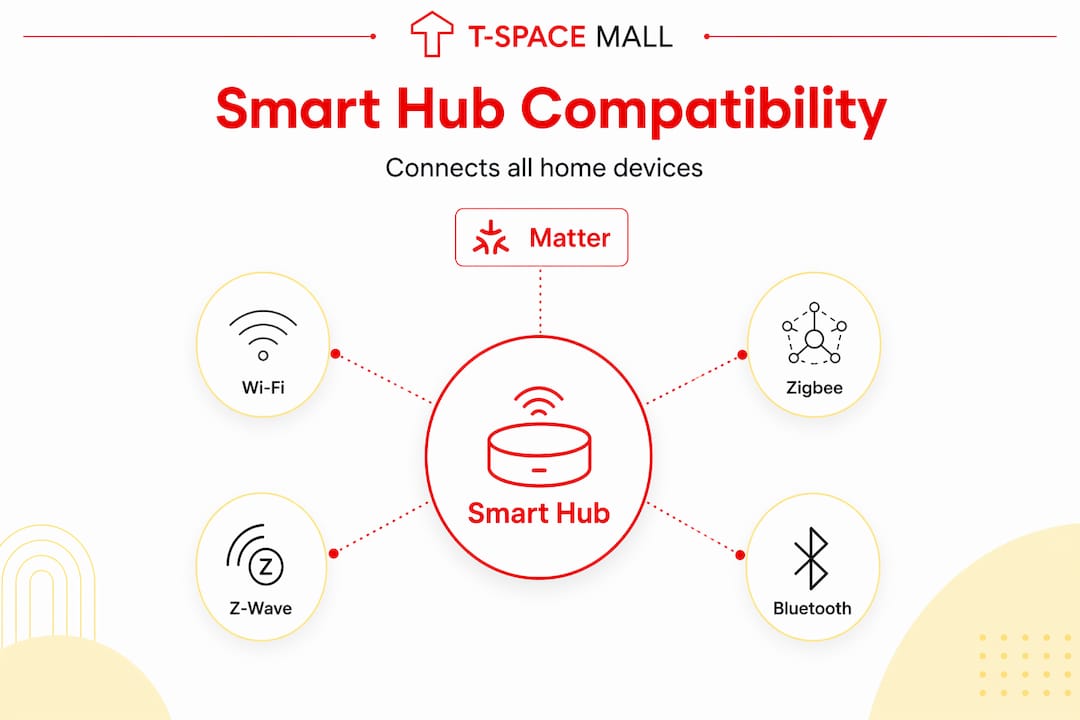
| Hubs unify all devices | A smart home hub connects Wi-Fi, Zigbee, Z-Wave, and Bluetooth devices through a single control point. |
| Local processing matters | Automations running locally continue working during internet outages and protect your household data. |
| Matter and Thread are the future | Modern hubs supporting Matter and Thread Border Routers future-proof your setup against protocol fragmentation. |
| Energy savings are measurable | Smart hub integration with aircon and sensors can reduce electricity costs significantly in Singapore’s tropical climate. |
| Not everyone needs a dedicated hub | Single-ecosystem Wi-Fi homes may manage without one, but complex automations and legacy devices demand it. |
What is a smart home hub and how does it work
Think of a smart home hub as the translator and conductor living inside your router cabinet. Every smart device in your home speaks a slightly different language. Your Zigbee bulbs, your Z-Wave door sensor, your Wi-Fi thermostat, and your Bluetooth speaker all use different wireless protocols. Without a hub, each device is an island. With one, they all connect to a single brain that understands every language and makes them act as one system.
At its technical core, a hub unifies control of Wi-Fi, Zigbee, Z-Wave, Bluetooth, and newer standards like Thread, reducing response latency and eliminating cloud reliance for routine automations. That last point matters more than most homeowners realise. When your automation runs locally on the hub’s own processor rather than pinging a server in America or Europe, it responds in milliseconds instead of seconds.
Here is what a smart home hub actually does in practice:
- Protocol translation. It converts signals between incompatible wireless standards so a Zigbee motion sensor can trigger a Wi-Fi air conditioning unit.
- Local automation engine. It runs conditional logic (if the living room is occupied and the temperature exceeds 27°C, turn on the aircon) without any internet connection required.
- Centralised scheduling. Morning routines, evening wind-downs, and security modes are programmed once and executed reliably.
- Device interoperability. Sensors, switches, locks, cameras, and appliances from entirely different manufacturers work as a single coordinated system.
- Remote access gateway. When you do want to check in from outside, the hub provides a single secure point of entry rather than dozens of separate cloud accounts.
The most capable hubs today support the Matter standard, which acts as a universal compatibility layer across ecosystems. This means your Apple HomeKit devices, Google Home products, and Amazon Alexa accessories can all report to the same hub.
Smart home hub features and Singapore-specific needs
Singapore’s living environment creates some specific requirements that homeowners elsewhere might not prioritise. In a 90-square-metre HDB flat, every device is relatively close together, but the sheer density of wireless traffic in an estate block can interfere with mesh networks. Protocol choice and hub quality matter here more than in a sprawling suburban bungalow.
Matter and Thread: what they mean for you
Many modern hubs support Matter, which integrates Zigbee, Thread, and others into a single device, removing the need for multiple protocol bridges cluttering your home network. Thread in particular is worth understanding. It creates a self-healing mesh network where devices act as repeaters for each other, which is genuinely useful in a larger flat or multi-storey landed home.
Thread Border Routers and Matter Controllers serve distinct roles. A Border Router bridges the Thread mesh to your IP network, while a Controller manages the application layer, meaning the actual automation logic. Robust setups include both, with redundancy built in. Experts recommend at least two Thread Border Routers in any network to maintain mesh reliability if one device reboots or fails.
Features worth prioritising
- Local-first processing. Local automation protects personal data and keeps your home running during internet outages, a real concern when your ISP drops at 11pm and your scheduled bedroom cooling routine simply must work.
- Energy management integration. Look for hubs that handle aircon controllers (like Sensibo or Cielo) alongside occupancy sensors for automated thermal management.
- Multi-protocol radio hardware. A hub with onboard Zigbee, Z-Wave, and Thread radios eliminates the need for separate dongles and bridges.
- Open API and community support. Platforms like Home Assistant have vast libraries of integrations, including Singapore-specific devices like local aircon brands and Singtel mesh routers.
- Internet outage resilience. A hub that drops all automations when your broadband fails is not a hub. It is an expensive cloud client.
Pro Tip: When choosing a hub, check whether it supports local processing without a subscription fee. Some commercial hubs move critical features behind a monthly paywall after the initial purchase, which quietly shifts your automations back to cloud dependency.
Benefits of smart home hubs for energy efficiency
Singapore’s electricity tariffs and the near-constant need for air conditioning make energy management one of the most compelling reasons to invest in a proper hub setup. The typical smart home setup in Singapore costs between $3,000 and $8,000, depending on integration depth and hardware choices. That is a meaningful investment, and the hub is what makes it pay off.

Air conditioning accounts for the largest portion of household electricity bills in Singapore. A hub coordinates your aircon controllers with occupancy sensors, door contacts, and even weather data to decide when and how hard to cool each room. An empty bedroom cooling itself at full blast for two hours is pure waste. A hub eliminates that automatically. You can explore how smart cooling integration works hand in hand with thoughtful interior design to keep rooms genuinely comfortable without overcooling.
AI-enabled hubs adjust lights and air conditioning based on occupancy and daylight levels, turning energy management into a background process rather than a daily manual task. Here is a realistic picture of what hub-enabled automation achieves in a Singapore context:
| Automation scenario | Without a hub | With a hub |
|---|---|---|
| Bedroom aircon at night | Manual on/off or timer only | Adjusts based on occupancy and room temperature |
| Corridor lighting | On until someone switches off | Turns off 5 minutes after no motion detected |
| Morning routine | Multiple app interactions | Single scene activates lights, aircon, and door unlock |
| Internet outage | All automations fail | Local automations continue uninterrupted |
| Away mode | Manual device-by-device switching | Single trigger turns off all non-essential devices |
Pro Tip: For presence-based aircon automation, motion sensors with a 30-minute timeout outperform GPS or Bluetooth tracking for occupancy detection. GPS triggers are slow and Bluetooth has range gaps. A well-placed PIR sensor in the hallway is often more reliable than your phone’s location.
Privacy is another underrated benefit. Local-first automation hubs mean your household movement data, sleep patterns, and usage behaviour never leave your home network. For families with children, this matters. Tspacemall has covered the connected theme of smart technology and child safety in detail, and the takeaway is consistent: local processing keeps sensitive data exactly where it belongs.
When you need a dedicated hub versus a voice assistant
This is the question most homeowners wrestle with, and the honest answer is: it depends on what you own and what you want to automate.
| Situation | Voice assistant sufficient | Dedicated hub needed |
|---|---|---|
| All devices are Wi-Fi or Matter | Yes | Optional |
| Mix of Zigbee and Z-Wave devices | No | Yes |
| Complex multi-condition automations | Limited | Yes |
| Local control during internet outages | No | Yes |
| Legacy devices without cloud support | No | Yes |
| Single brand ecosystem (e.g. all Philips Hue) | Possibly | No |
Not all users require a dedicated hub. If your home runs entirely on Matter or Wi-Fi devices within one ecosystem, Google Home or Amazon Alexa may handle day-to-day control adequately. The gaps appear when you add a Zigbee sensor from one brand, a Z-Wave lock from another, and a locally controlled aircon unit that has no native cloud integration.
Voice assistants are front-ends. They take commands, manage basic scenes, and connect to cloud services. A dedicated hub is the back-end. It processes logic, manages protocols, stores device states locally, and executes automations even when you are asleep and no one has spoken a word to any assistant. For Singaporean homeowners who want their home to act intelligently without constant manual input, a dedicated platform like Home Assistant or Hubitat is the right foundation.
The trap to avoid is running multiple overlapping hubs. Having one hub for Zigbee, a separate bridge for your Hue lights, another for your Yale lock, and Google Home on top creates a fragmented system that is harder to maintain than a single well-chosen platform.
Choosing and setting up your smart home hub
Getting the setup right from the start saves considerable rework later. Here is how to approach it practically.
- Audit your devices. List every smart device you own or plan to buy. Note the protocol each one uses. This list determines which hub radios you need.
- Choose your platform. Home Assistant suits technically confident homeowners who want full control and privacy. Hubitat offers a solid local-first experience with a more accessible interface. Commercial hubs like SmartThings are easier to set up but more cloud-dependent.
- Plan your hardware. For resilience, run your hub on dedicated local hardware, such as a Raspberry Pi 5 or a mini-PC, with a UPS (uninterruptible power supply) to keep automations running through short power fluctuations. This is particularly relevant in Singapore where occasional supply dips do occur.
- Segment your network. Place your smart home devices on a separate VLAN from your main devices. This limits the blast radius if any device is compromised and reduces wireless congestion.
- Start with core automations. Begin with lighting and aircon, the two highest-impact areas for comfort and energy saving. Get those reliable before adding complexity.
- Test resilience deliberately. Unplug your router and check whether your core automations still fire. If they do not, your hub is more cloud-dependent than you realised.
- Maintain firmware and backups. Schedule monthly firmware updates and keep an automated backup of your hub’s configuration. Rebuilding a complex automation setup from memory is a painful experience.
My honest take on smart home hubs in Singapore
By Jonathan
I’ve helped a number of homeowners in Singapore work through their smart home setups, and the pattern I see most often is this: people invest in good hardware, connect it to cloud-dependent platforms, and then discover that the “smart” part stops working the moment their ISP has a bad night.
What I’ve learned is that local control is not a feature for power users. It is the baseline for any home you actually want to rely on. The moment your morning routine fails because a cloud server in Dublin is down, the illusion of a smart home breaks entirely.
In my experience, the biggest gains come from aircon automation. Singapore’s heat is relentless, and most people are either overcooling empty rooms or walking into warm ones. A hub with solid occupancy logic solves both problems. The challenge is presence detection, which sounds easier than it is. GPS is slow, Bluetooth is patchy, and phone-based tracking requires everyone in the household to be enrolled. I’ve found that a simple PIR sensor with a sensible timeout is the most dependable approach by a wide margin.
My honest advice: invest once in a good local-first hub, build your automations carefully, and resist the temptation to add every gadget that comes to market. A home with thirty reliable automations is more comfortable than one with a hundred that half-work. The hub pays for itself. The time spent untangling a fragmented setup does not.
— Jonathan
Transform your home with T-Space Mall’s experts
If you are ready to move beyond individual smart devices and build a properly integrated home, the experts at Tspacemall are the right starting point. T-Space Mall in the East of Singapore brings together interior design specialists and renovation contractors who understand how smart technology fits into the fabric of a well-designed home, not as an afterthought, but as a core part of the living experience.

Whether you are planning a new BTO renovation or upgrading an existing space, the team at Tspacemall can connect you with professionals who integrate smart home systems from the ground up. From home and living renovation specialists to lighting and cooling experts, everything is under one roof. Visit T-Space Mall to explore what a genuinely smart, energy-efficient Singapore home can look like when design and technology work together from day one.
FAQ
What is a smart home hub in simple terms?
A smart home hub is a central device that connects and controls all your smart home gadgets from one place, translating between different wireless protocols so they work together without separate apps or bridges.
Do I need a smart home hub if I already have Google Home or Alexa?
Voice assistants work well for simple commands within a single ecosystem, but they cannot replace a dedicated hub if you have Zigbee or Z-Wave devices, need local automations during internet outages, or want complex multi-condition logic to run reliably.
How does a smart home hub help with energy efficiency in Singapore?
A hub coordinates your aircon, occupancy sensors, and lighting to automate cooling based on actual room use rather than fixed timers, reducing electricity consumption without sacrificing comfort in Singapore’s tropical climate.
What is Matter and why does it matter for my hub choice?
Matter is a universal smart home standard that lets devices from different brands communicate on the same platform. Choosing a hub that supports Matter future-proofs your setup and reduces the need for multiple protocol bridges.
How much does a smart home hub setup cost in Singapore?
A complete smart home setup in Singapore typically ranges from $3,000 to $8,000, depending on the number of devices, integration complexity, and whether professional installation is included.
Recommended


